|
Standalone Mode / Device Control |
|
Device Status
Displays the current status of the device with respect to
|
Status |
Description |
|---|---|
|
Standalone mode deactivated |
The standalone mode is not activated on the device. |
|
Standalone mode activated |
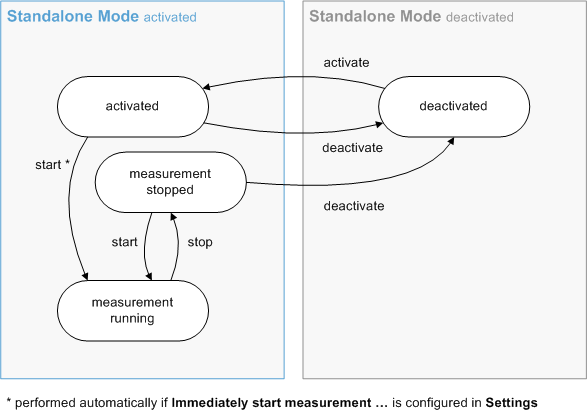
The standalone mode is activated on the device. This means that the measurement can be started via CANoe/CANalyzer ([Start] button) or via a keypad connected to the device. This operating mode is also activated immediately when the device is switched on. |
|
Standalone measurement running |
The standalone mode is activated on the device and the measurement runs there (using the real-time relevant part of the configuration loaded on the device). |
|
Standalone measurement completed |
The standalone mode is activated on the device and the measurement there is finished. |
The following buttons are available for controlling the standalone mode on the selected device.
|
Button |
Description |
|---|---|
|
[Activate] |
The standalone mode is activated on the device. The measurement with the standalone configuration loaded on the device can now be started either via CANoe/CANalyzer or with the aid of a keypad connected to the device. Note: No physical connection to the computer is required during standalone mode. If a physical connection exists, the logical connection to CANoe/CANalyzer is terminated so that the conventional measurement start is no longer possible. |
|
[Deactivate] |
The standalone mode is deactivated on the device. Deactivating the standalone mode means the following.
The standalone mode remains disabled the next time the device is turned on. The [Deactivate] button appears instead of [Activate] when the standalone mode is enabled on the selected device. |
|
[Start] |
The measurement is started with the standalone configuration that was previously loaded onto the device |
|
[Stop] |
The standalone measurement is terminated. The standalone mode remains activated so that the measurement can be restarted. The [Stop] button appears instead of [Start] when the standalone mode is activated on the selected device and the measurement is running. |
Visual display of status and status changes in standalone mode.
Device Configuration
Under Loaded configuration the name of the configuration file is displayed whose real-time relevant part was last loaded to the device. The time at which the configuration file was last saved on the user computer is also specified.
The real-time relevant part of the configuration is downloaded to the device via the [Download] button. If the download fails, an error message appears, for example, if the configuration contains modules that are not supported in standalone mode (see Configuration Requirements).
|
|
Note The configuration loaded on the device is bound to the current version of CANoe |

Via the [Export...] button you can export the current configuration.
Via the [Open...] button you can open the
Start Behavior
The start behavior after switching on is not affected by the measurement stop.
Select either Wait for explicit start command or Immediately start measurement after boot.