|
User manual |
| |
Typical Usage of Peripheral Initialization Components
Init method
Init method is defined in all Peripheral Initialization Components. Init method contains a complete initialization of the peripheral according to the component's settings.
In the following examples, let's assume a component named "Init1" has been added to the project.
The Init method of the Peripheral Initialization component can be used in two ways.
- The Init method is called by Processor Expert
- The Init method is called by the user in his/her module
The user can let Processor Expert call the Init method automatically by selecting "yes" for the Call Init method in the Initialization group of the Component's properties.
When this option is set, Processor Expert places the call of the Init method into the PE_low_level_init function of the CPU.c module.
Manual calling of InitAdd the call of the Init method into the user's code, for example in main module.
Enter the following line into the main module file:
Init1_Init();
Put the Init method right below the PE_low_level_init call.
void main(void)
{
  /*** Processor Expert internal initialization. ***/
  PE_low_level_init();
  /*** End of Processor Expert internal initialization. ***/
  Init1_Init();
  for(;;) {}
}
Interrupt Handling
Some Peripheral Initialization components allow the initialization of an interrupt service routine. Interrupt(s) can be enabled in the initialization code using appropriate properties that can be usually found within the group Interrupts.
After enabling, the specification of an Interrupt Service Routine (ISR) name using the ISR name property is required. This name is generated to Interrupt Vector table during the code generation process.
Please note that if the ISR name is filled, it is generated into the Interrupt Vector Table even if the interrupt property is disabled.
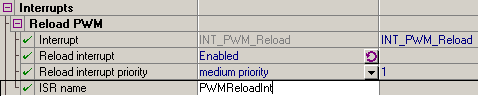 |
| Figure 1 - Example Of The Interrupt Setup |
Enabling/disabling peripheral interrupts during runtime has to be done by user's code, for example by utilizing PESL or direct register access macros, because the Peripheral Initialization Components do not offer any methods for interrupt handling.
The ISR with the specified name has to be declared according to the compiler conventions and fully implemented by the user. If the project option Project Options | Generate ISR is enabled, declarations of the ISRs that already do not exist can be generated automatically by PE during the code generation process into the Event module of the CPU component. The project option is visible in the Advanced level of view. The name of the CPU event module could be changed in the Advanced view mode of the Component Inspector.
PROCESSOR EXPERT is trademark of Freescale Semiconductor, Inc.