| BWimage | |
|
|

The component provides features which covers loading an external image file and converting it into the internal image array. The user can handle the image by GetImage method which returns pointer to the image structure. This structure consist of information about image width, height, size, name and also the image data itself (for details see User types page).
Image data representation:
The component generates image data line by line as array of bytes where each pixel of image is represented by one bit (1=black, 0=white), left pixel
is denoted as MSB in the byte value.
Number of bytes used per line is rounded to ((image width + 7) div 8) bytes.
Size of the whole array is corresponding to (bytes per line * image height) bytes.
Example of image (9x7 pixels):
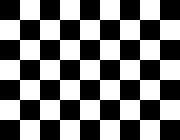 |
10101010 = 0xAA, 10000000 = 0x80 01010101 = 0x55, 00000000 = 0x00 10101010 = 0xAA, 10000000 = 0x80 01010101 = 0x55, 00000000 = 0x00 10101010 = 0xAA, 10000000 = 0x80 01010101 = 0x55, 00000000 = 0x00 10101010 = 0xAA, 10000000 = 0x80 |
This example image is converted into the array Pixmap[14] =
The component accept only black & white or color image files that are in the BMP format. The color images are limited to 16 or 256 color and they are internally converted into black & white representation. Black color is convert to black color and other colors are convert to white color, therefore it is recommended to convert such images by external tool and then using it as input instead of direct using color images as input to this component.