# lwip_tcpecho_rtthread-nano
## Overview
This example shows TCP echo communication on RTThread-Nano.
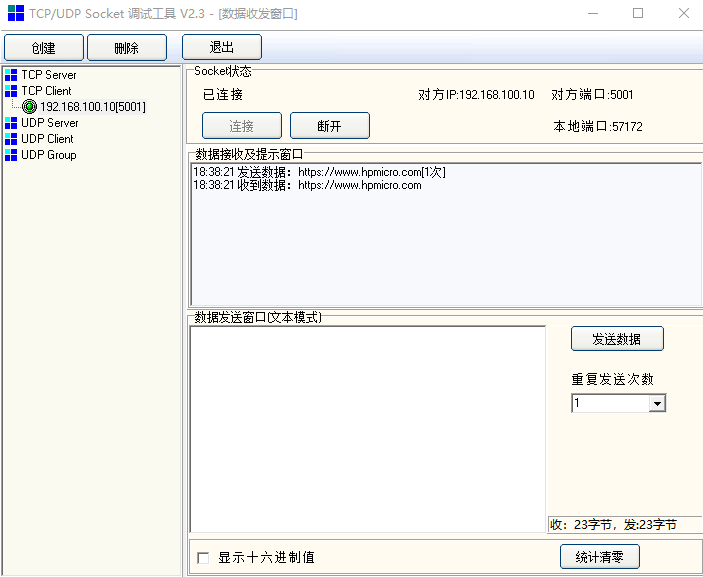
- PC sends TCP data frames to MCU, and then MCU sends the data frames back to PC
## Board Settings
- Connect a USB port on PC to the PWR DEBUG port on the development board with a USB Type-C cable
- Connect an Ethernet port on PC to a RGMII port or a RMII port on the development board with an Ethernet cable
## Project Configuration
- Ethernet Port Settings: Refer to [Ethernet common project settings](../doc/Ethernet_Common_Project_Settings_en.md)
- Ethernet DHCP Configurations
- the configurations in the `CMakeLists.txt` as follows:
- sdk_compile_definitions(-DLWIP_DHCP=0): Disable DHCP feature
- sdk_compile_definitions(-DLWIP_DHCP=1): Enable DHCP feature
## Run Example
- Compiling and Downloading
- Running log is shown in the serial terminal as follows:
```console
This is an ethernet demo: TCP Echo on RTThread-Nano
LwIP Version: 2.1.2
\ | /
- RT - Thread Operating System
/ | \ 3.1.5 build Jan 10 2024
2006 - 2020 Copyright by rt-thread team
Enet phy init passed !
msh >Link Status: Up
Link Speed: 1000Mbps
Link Duplex: Full duplex
IPv4 Address: 192.168.100.10
IPv4 Netmask: 255.255.255.0
IPv4 Gateway: 192.168.100.1
```
- Run an Ethernet debugging tool
- create and set a TCP client: TCP Server IP: 192.168.100.10/Port: 5001
**Note: There is a necessary adjustment for Server IP according to the segment of LAN where PC resides**
- Connect
- Enter and send any characters in the edit window
 - Watch the characters echoed from MCU